Day 16 – Match-Case Statements in Python
🚀 Passionate DevOps Engineer with expertise in cloud computing, CI/CD, and automation. Skilled in Linux, Docker, Kubernetes, Terraform, Ansible, and Jenkins. I specialize in building scalable, secure, and automated infrastructures, optimizing software delivery pipelines, and integrating DevSecOps practices. Always exploring new ways to enhance deployment workflows and bridge the gap between development and operations.
Welcome to Day 16 of 100 Days of Python!
Today, we are learning another way to implement decision-making logic in Python: the match-case statement.
If you have previously worked with languages such as C, C++, or Java, you may already be familiar with the concept of a switch-case statement.
Python does not use the traditional switch keyword. Instead, modern Python provides the match statement, introduced in Python 3.10, which supports pattern matching.
At a basic level, match-case allows us to compare a value against different patterns and execute the first matching case.
What We Will Learn
In this tutorial, we will learn:
What
match-caseisWhy
match-caseis similar toswitch-caseBasic
matchsyntaxThe
casekeywordMatching literal values
The
_wildcard patternAdding conditions using
ifHow Python evaluates cases
How
match-casediffers fromif-elif-elseUnderstanding our complete program
1. What Is match-case?
The match statement is used for structural pattern matching in Python.
For simple cases, it can be used to compare a value against several possible values.
For example:
x = 2

match x:
    case 1:
        print("One")
    case 2:
        print("Two")
    case 3:
        print("Three")
Since:
x = 2
matches:
case 2:
Python prints:
Two
2. Why Use match-case?
Suppose we want to compare one variable with several possible values.
We could write:
if x == 1:
    print("One")
elif x == 2:
    print("Two")
elif x == 3:
    print("Three")
elif x == 4:
    print("Four")
else:
    print("Something else")
For many fixed-value choices, this can become repetitive.
A match-case structure can express the same type of logic more clearly:
match x:
    case 1:
        print("One")
    case 2:
        print("Two")
    case 3:
        print("Three")
    case 4:
        print("Four")
    case _:
        print("Something else")
The match statement is especially useful when the program needs to compare a value against multiple patterns.
3. Basic Syntax
The basic structure is:
match variable:
    case pattern1:
        # statements
    case pattern2:
        # statements
    case pattern3:
        # statements
    case _:
        # default case
There are three important components:
1. match
The match keyword starts the pattern-matching statement.
2. case
Each case defines a pattern that Python attempts to match.
3. Pattern
The pattern describes what should match the value.
For example:
case 0:
matches the value 0.
4. Simple Example
Consider:
x = 4

match x:
    case 0:
        print("x is zero")
    case 4:
        print("x is four")
    case _:
        print("Some other number")
Python checks the cases from top to bottom.
First:
x == 0
is not a match.
Then:
x == 4
matches.
Therefore, Python executes:
print("x is four")
Output:
x is four
5. How Python Evaluates match-case
The basic execution flow looks like this:
             Start
               |
               v
        Evaluate match value
               |
               v
          Check case 1
               |
          Match found?
          /          \
        Yes           No
         |             |
         v             v
    Execute case    Check case 2
                       |
                  Match found?
                       |
                      ...
                       |
                       v
                  case _ default
Python evaluates cases in order.
Once a matching case is selected, its block executes and the match statement finishes.
6. The _ Wildcard
One of the most important parts of match-case is:
case _:
The underscore _ acts as a wildcard pattern.
It can match a value when no previous case has matched.
For example:
x = 100

match x:
    case 1:
        print("One")
    case 2:
        print("Two")
    case _:
        print("Something else")
Neither case 1 nor case 2 matches 100.
Therefore:
case _:
matches.
Output:
Something else
7. _ Is Similar to else
For simple value matching, you can think of:
case _:
as being similar to:
else:
in an if-elif-else structure.
For example:
if x == 1:
    print("One")
elif x == 2:
    print("Two")
else:
    print("Something else")
can be expressed as:
match x:
    case 1:
        print("One")
    case 2:
        print("Two")
    case _:
        print("Something else")
However, technically, _ is a wildcard pattern, not literally an else statement.
8. Matching 0
Our program contains:
case 0:
    print("x is zero")
This matches when the value being matched is 0.
For example:
Enter a number: 0
The output will be:
x is zero
9. Adding a Condition to a Case
One of the interesting features of match-case is that a case can include an additional condition.
This is called a guard.
The syntax is:
case pattern if condition:
    # code
For example:
x = 4

match x:
    case 4 if x % 2 == 0:
        print("Four and even")
Here there are two things involved:
Pattern
case 4
The value must match 4.
Guard
if x % 2 == 0
The additional condition must also be True.
Only when both requirements are satisfied does the case execute.
10. Understanding the % Operator
Our program uses:
x % 2 == 0
The % operator is the modulo operator.
It returns the remainder after division.
For example:
4 % 2
returns:
0
because 4 is exactly divisible by 2.
Another example:
5 % 2
returns:
1
Therefore:
x % 2 == 0
checks whether x is even.
11. Understanding the Special case 4
Our program contains:
case 4 if x % 2 == 0:
    print("x % 2 == 0 and case is 4")
This means:
xmust match the value4.The guard
x % 2 == 0must also beTrue.
For:
x = 4
we have:
x == 4       → True
x % 2 == 0   → True
Therefore, the case executes.
Output:
x % 2 == 0 and case is 4
12. A Case With Only a Guard
Our program also contains:
case _ if x < 10:
    print("x is < 10")
This is interesting because _ matches anything, while the guard restricts the case.
The condition:
x < 10
must be True.
For example, if:
x = 7
the earlier cases don't match, and:
x < 10
is True.
Therefore:
x is < 10
is printed.
13. The Default Case
The final case in our program is:
case _:
    print(x)
This acts as a catch-all case.
If none of the previous cases matches, this case will match.
For example:
Enter a number: 25
The program checks:
case 0
No match.
Then:
case 4 if x % 2 == 0
No match.
Then:
case _ if x < 10
25 < 10 is False.
Finally:
case _:
matches.
The program prints:
25
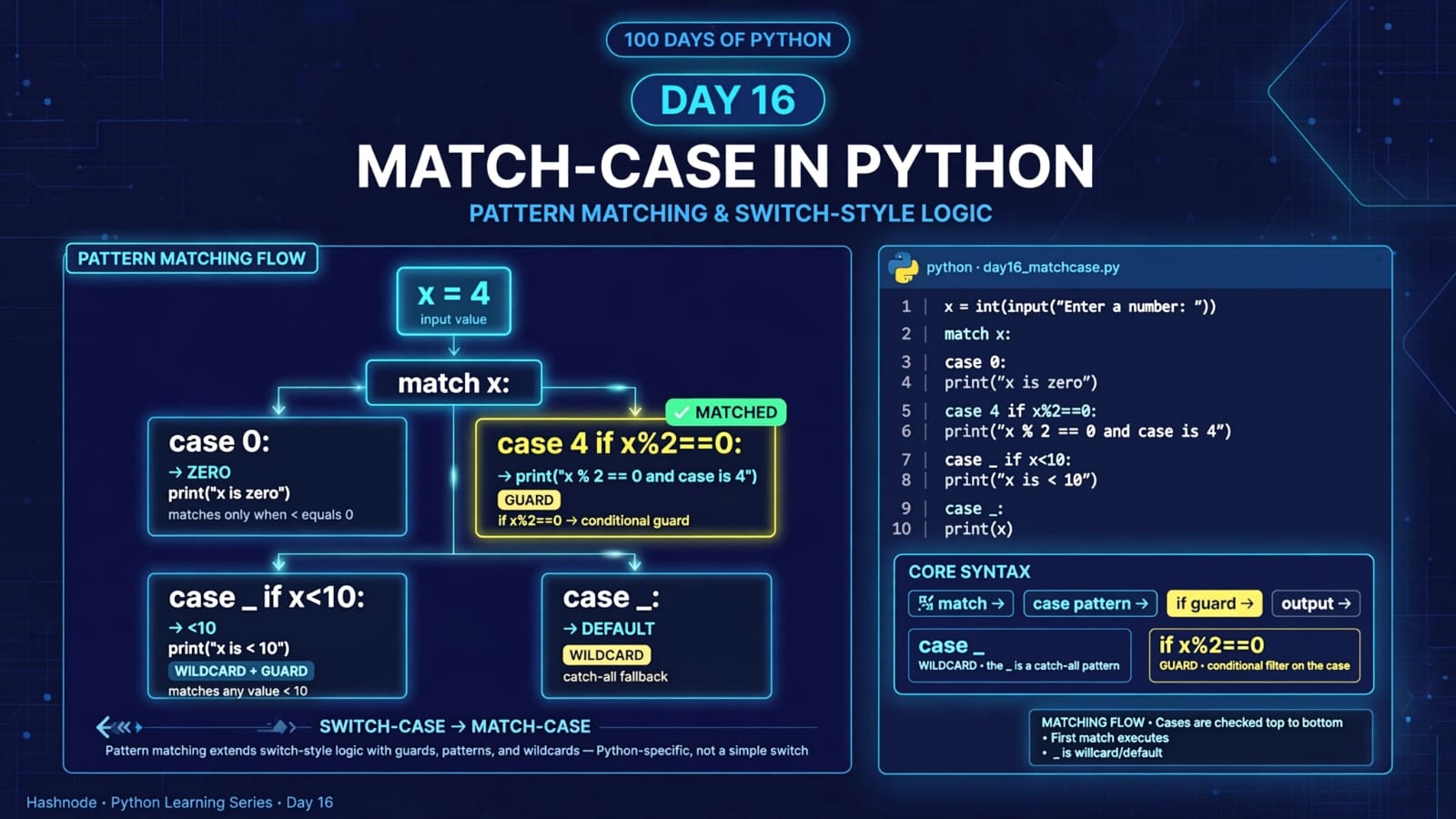
14. Understanding main.py
Our complete program is:
x = int(input("Enter a number: "))

match x:

    case 0:
        print("x is zero")

    case 4 if x % 2 == 0:
        print("x % 2 == 0 and case is 4")

    case _ if x < 10:
        print("x is < 10")

    case _:
        print(x)
Let's understand the execution flow.
15. Step 1 – Taking User Input
x = int(input("Enter a number: "))
First, the program asks the user to enter a number.
The input() function returns text, so we use:
int()
to convert it into an integer.
For example:
Enter a number: 4
Now:
x
contains the integer:
4
16. Step 2 – Start Matching
Next:
match x:
Python now starts comparing x with the available cases.
The cases are checked in order.
17. Step 3 – Check case 0
case 0:
    print("x is zero")
If:
x == 0
then this case matches.
Example:
Enter a number: 0
Output:
x is zero
18. Step 4 – Check case 4 if ...
Next:
case 4 if x % 2 == 0:
For:
x = 4
the pattern matches and the guard is also true.
Therefore:
x % 2 == 0 and case is 4
is printed.
19. Step 5 – Check the Guarded Wildcard
Next:
case _ if x < 10:
The _ wildcard can match the value, but the guard must also be true.
For example:
x = 7
Then:
7 < 10
is True.
Output:
x is < 10
20. Step 6 – Catch-All Case
Finally:
case _:
    print(x)
If none of the earlier cases matched, this catches the remaining values.
For example:
Enter a number: 25
Output:
25
21. Different Inputs and Outputs
Let's test different values.
Input: 0
Enter a number: 0
x is zero
Input: 4
Enter a number: 4
x % 2 == 0 and case is 4
Input: 7
Enter a number: 7
x is < 10
Input: 25
Enter a number: 25
25
Input: -5
Enter a number: -5
x is < 10
Notice that -5 < 10 is also True.
This demonstrates why the order of cases and their conditions matters.
22. Match-Case vs If-Elif-Else
Both structures can implement decision-making, but they are not exactly the same.
if-elif-else
if x == 0:
    print("Zero")
elif x == 1:
    print("One")
else:
    print("Other")
match-case
match x:
    case 0:
        print("Zero")
    case 1:
        print("One")
    case _:
        print("Other")
For simple equality-based choices, these can look very similar.
However, Python's match statement is more powerful than a traditional switch because it supports pattern matching, including more complex structures.
23. Match-Case Is More Than a Traditional Switch
It is common to describe match-case as Python's equivalent of switch-case.
That comparison is useful for beginners, but it is not the complete story.
Python's match statement supports structural pattern matching.
For example, it can match different structures and extract values from them.
A simple example:
point = (0, 0)

match point:
    case (0, 0):
        print("Origin")
    case (x, 0):
        print("Point on X-axis")
    case (0, y):
        print("Point on Y-axis")
    case _:
        print("Somewhere else")
This is one reason Python calls it pattern matching, rather than simply calling it a switch statement.
24. Important Note About Python Version
The match statement was introduced in:
Python 3.10
Therefore, programs using:
match
case
require Python 3.10 or a newer version.
If you try to run this syntax on an older Python version, it will not work.
25. Important Concepts at a Glance
| Concept | Meaning |
|---|---|
match |
Starts pattern matching |
case |
Defines a pattern to match |
_ |
Wildcard pattern |
if after case |
Guard condition |
int() |
Converts input into an integer |
% |
Modulo/remainder operator |
== |
Equality comparison |
| Pattern | Describes what should match |
| Guard | Additional condition checked after a pattern matches |
| Python 3.10+ | Required for match-case syntax |
26. Quick Revision
What is match-case?
It is Python's pattern-matching statement used to compare a value against different patterns.
What is case?
case defines a pattern that Python attempts to match against the value given to match.
What does _ mean?
It is a wildcard pattern that can match any value when reached.
case _:
is commonly used as a catch-all case.
Can we add conditions to cases?
Yes.
case 4 if x % 2 == 0:
The if part is called a guard.
What does % do?
It returns the remainder of a division.
4 % 2
returns:
0
Which Python version introduced match-case?
Python 3.10.
27. Key Takeaways
match-caseprovides pattern matching in Python.It can be used for switch-like decision-making.
The
matchkeyword specifies the value being matched.Each
casedefines a possible pattern.Cases are evaluated in order.
case _:works as a catch-all wildcard pattern.A case can have an additional
ifguard.The guard is checked when the pattern matches.
match-caseis more powerful than a traditionalswitch-casebecause Python supports structural pattern matching.match-casewas introduced in Python 3.10.For simple conditions,
if-elif-elsemay be more natural; for matching patterns or multiple fixed choices,match-casecan make the structure clearer.
📂 Day 16 Resources
https://github.com/SriteshSuranjan/100-Days-of-Python/tree/main/16-Day16-Match-Case