Day 15 – Exercise 2: Good Morning Sir in Python
🚀 Passionate DevOps Engineer with expertise in cloud computing, CI/CD, and automation. Skilled in Linux, Docker, Kubernetes, Terraform, Ansible, and Jenkins. I specialize in building scalable, secure, and automated infrastructures, optimizing software delivery pipelines, and integrating DevSecOps practices. Always exploring new ways to enhance deployment workflows and bridge the gap between development and operations.
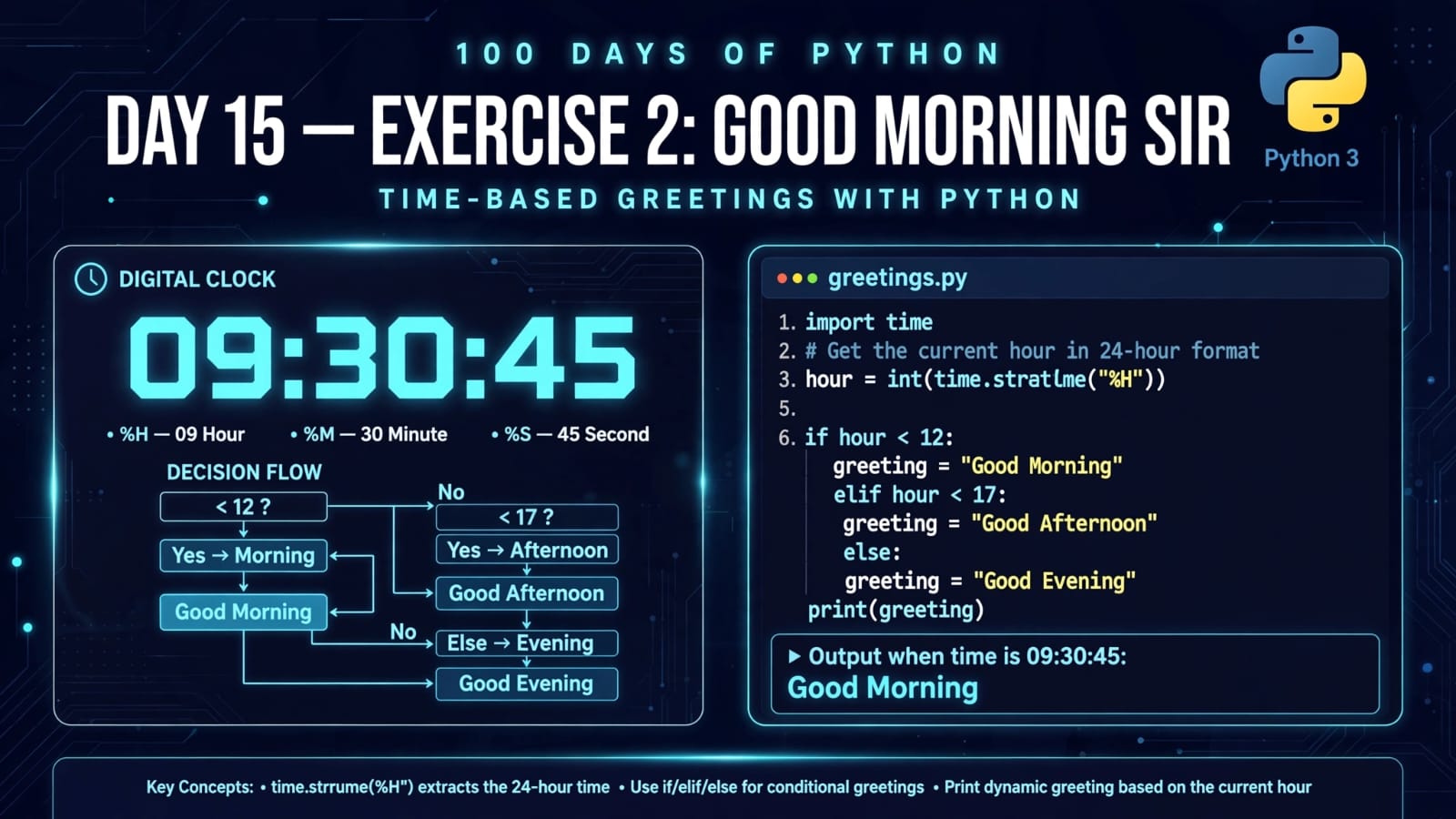
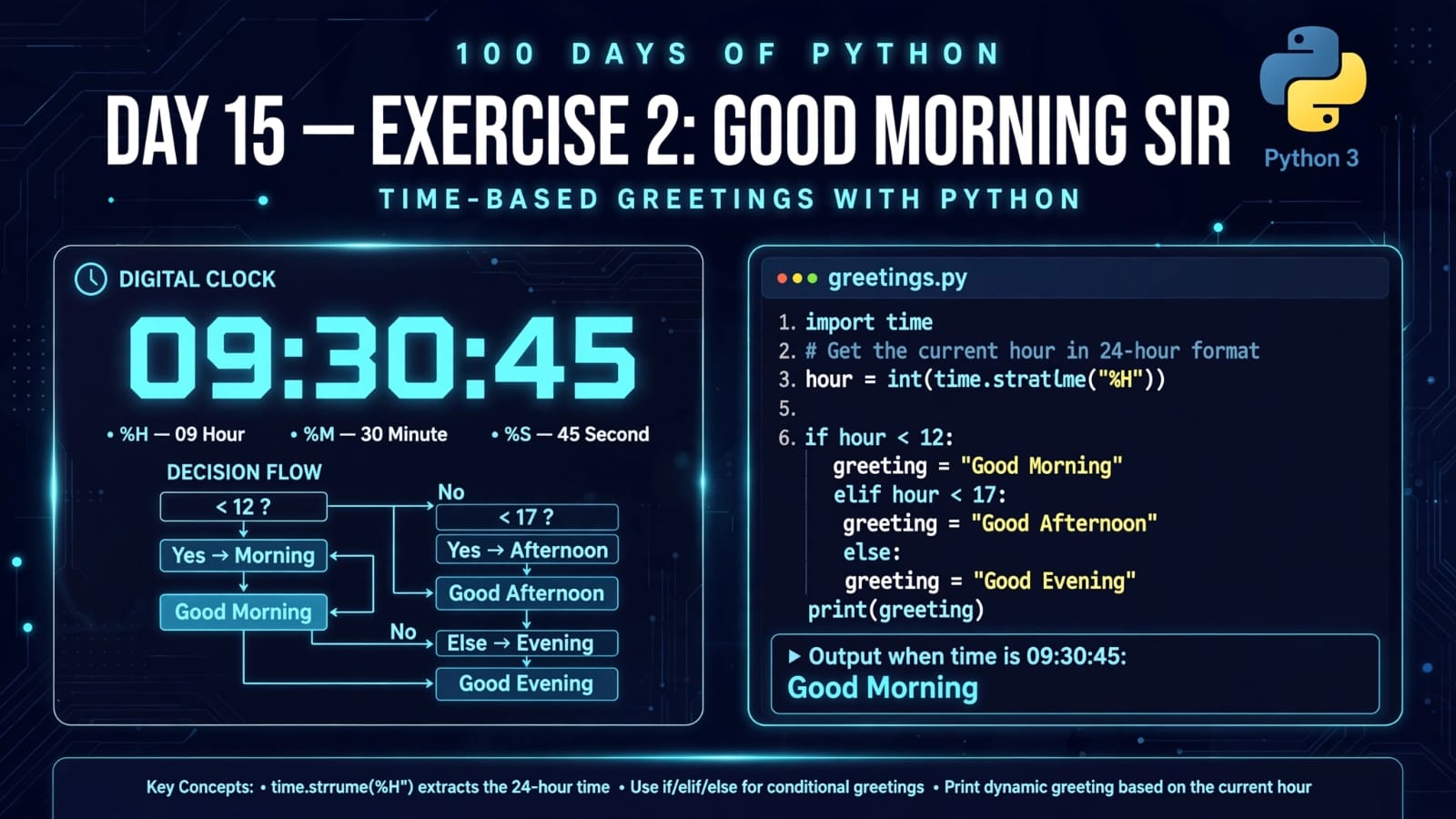
Welcome to Day 15 of 100 Days of Python!
Today, we are working on Exercise 2: Good Morning Sir.
This exercise combines two important concepts we have already started learning:
Python modules
Conditional statements
The goal of the exercise is to create a program that checks the current time and greets the user appropriately:
Good Morning
Good Afternoon
Good Evening
To determine the current time, Python provides the built-in time module.
In today's main.py, we first learn how to retrieve the current hour, minute, and second using time.strftime().
What We Will Learn
In this exercise, we will learn:
What the
timemodule isHow to import a module
What
time.strftime()doesHow to get the current time
How to extract the hour, minute, and second
Meaning of
%H,%M, and%SHow time information can be used with conditional statements
How to build a time-based greeting program
1. What Is the time Module?
Python provides many built-in modules that contain useful functionality.
One of them is the:
time
module.
The time module provides functions for working with:
Time
Dates and timestamps
Formatting time
Measuring time intervals
Delays and other time-related operations
To use it, we first import it:
import time
After importing the module, we can access its functions using:
time.function_name()
2. Importing the time Module
Our program begins with:
import time
This tells Python that we want to use functionality provided by the time module.
For example:
import time

print(time.strftime('%H:%M:%S'))
This can produce output similar to:
09:35:42
The exact output depends on the current time when the program runs.
3. What Is strftime()?
The strftime() function is used to format a time value into a string according to a specified format.
The name comes from:
string format time
In our program:
time.strftime('%H:%M:%S')
we provide a formatting pattern:
%H:%M:%S
Each part represents a different component of the current time.
4. Understanding %H:%M:%S
The format:
'%H:%M:%S'
contains three important format codes.
| Code | Meaning | Example |
|---|---|---|
%H |
Hour in 24-hour format | 09, 14, 21 |
%M |
Minute | 05, 30, 59 |
%S |
Second | 03, 42, 58 |
The colon : is simply a separator.
For example:
14:30:45
means:
Hour   = 14
Minute = 30
Second = 45
5. Getting the Complete Current Time
Our first statement is:
timestamp = time.strftime('%H:%M:%S')
Here, Python gets the current local time and formats it as:
HH:MM:SS
For example:
08:25:17
The result is stored in the variable:
timestamp
Then:
print(timestamp)
prints it to the terminal.
Example:
08:25:17
The exact output will change depending on when you execute the program.
6. Getting Only the Current Hour
Next, we have:
timestamp = time.strftime('%H')
print(timestamp)
Instead of requesting:
'%H:%M:%S'
we request only:
'%H'
Therefore, Python returns only the hour.
For example:
08
or:
17
or:
21
The %H format code represents the hour using a 24-hour clock, from:
00 → 23
7. Getting Only the Current Minute
Next:
timestamp = time.strftime('%M')
print(timestamp)
Here %M represents the current minute.
Possible output:
37
The minute ranges from:
00 → 59
For example, if the current time is:
14:37:52
then:
time.strftime('%M')
returns:
37
8. Getting Only the Current Second
Finally:
timestamp = time.strftime('%S')
print(timestamp)
%S represents the current second.
Possible output:
52
The second ranges from:
00 → 59
9. Understanding the Complete main.py
Our current program is:
import time

timestamp = time.strftime('%H:%M:%S')
print(timestamp)

timestamp = time.strftime('%H')
print(timestamp)

timestamp = time.strftime('%M')
print(timestamp)

timestamp = time.strftime('%S')
print(timestamp)
Let's understand the execution step by step.
Step 1 – Import the Module
import time
Python loads the time module so that we can use its functionality.
Step 2 – Get Complete Time
timestamp = time.strftime('%H:%M:%S')
This gets the current hour, minute, and second.
Example:
09:42:15
Step 3 – Print Complete Time
print(timestamp)
Output:
09:42:15
Step 4 – Get Hour
timestamp = time.strftime('%H')
Example:
09
Step 5 – Get Minute
timestamp = time.strftime('%M')
Example:
42
Step 6 – Get Second
timestamp = time.strftime('%S')
Example:
15
10. Example Output
Because the program uses the current system time, the output will be different every time you run it.
For example, if the program runs at approximately 9:42:15 AM, the output could be:
09:42:15
09
42
15
Another person running the same program at a different time could get:
18:27:53
18
27
53
Therefore, this program does not have one fixed output.
11. Why Does %H Use 24-Hour Format?
The %H format code represents the hour in the range:
00 - 23
For example:
| 24-Hour Time | Meaning |
|---|---|
00 |
Midnight |
06 |
6 AM |
09 |
9 AM |
12 |
Noon |
15 |
3 PM |
18 |
6 PM |
21 |
9 PM |
23 |
11 PM |
This is particularly useful for our exercise because we can use the hour to decide which greeting should be displayed.
12. Connecting Time With Conditional Statements
In Day 14, we learned about:
if
elif
else
Now we can combine those concepts with the time module.
For example:
import time

hour = int(time.strftime('%H'))

if hour < 12:
    print("Good Morning Sir")
elif hour < 17:
    print("Good Afternoon Sir")
else:
    print("Good Evening Sir")
Here, the current hour is retrieved using:
time.strftime('%H')
But there is one important detail.
strftime() returns a string, so we convert it into an integer:
int(time.strftime('%H'))
This allows us to perform numerical comparisons such as:
hour < 12
13. Building the Good Morning Sir Exercise
The intended exercise is to create a program that greets the user based on the current time.
One possible implementation is:
import time

hour = int(time.strftime('%H'))

if hour < 12:
    print("Good Morning Sir")
elif hour < 17:
    print("Good Afternoon Sir")
else:
    print("Good Evening Sir")
How It Works
First:
hour = int(time.strftime('%H'))
gets the current hour.
Suppose the current hour is:
09
After converting it:
hour
becomes:
9
Then Python checks:
if hour < 12:
Since:
9 < 12
is True, it prints:
Good Morning Sir
14. Morning, Afternoon and Evening Conditions
A simple greeting structure can be:
00 – 11  → Good Morning
12 – 16  → Good Afternoon
17 – 23  → Good Evening
Using Python:
if hour < 12:
    print("Good Morning Sir")
elif hour < 17:
    print("Good Afternoon Sir")
else:
    print("Good Evening Sir")
Notice that we don't need to write:
elif hour >= 12 and hour < 17:
because once Python reaches the elif, we already know that:
hour >= 12
is true.
This makes the condition simpler:
elif hour < 17:
15. Why Convert the Hour to an Integer?
Consider:
hour = time.strftime('%H')
The value stored in hour is a string.
For example:
hour = "09"
For numerical comparisons, it is clearer to convert it:
hour = int(time.strftime('%H'))
Now:
hour = 9
and we can safely perform numerical comparisons:
hour < 12
hour < 17
This is an important example of combining:
String → Integer → Comparison → Decision
16. strftime() Format Codes Used Today
Here are the main format codes from today's exercise:
| Format Code | Meaning | Example |
|---|---|---|
%H |
Hour, 24-hour format | 18 |
%M |
Minute | 35 |
%S |
Second | 42 |
%H:%M:%S |
Hour, minute and second | 18:35:42 |
There are many other formatting codes available in Python's time module, but these are the ones used in today's exercise.
17. Important Difference: time vs timestamp
The variable:
timestamp
is simply the name chosen in the tutorial/program.
For example:
timestamp = time.strftime('%H')
does not mean that the value is a Unix timestamp.
It is simply a string containing the formatted hour.
A clearer variable name for the greeting exercise would be:
hour = int(time.strftime('%H'))
Similarly:
current_time = time.strftime('%H:%M:%S')
would clearly describe the value being stored.
18. Complete Practical Version
Combining today's exercise with the conditional statements from Day 14:
import time

current_time = time.strftime('%H:%M:%S')
hour = int(time.strftime('%H'))

print("Current time:", current_time)

if hour < 12:
    print("Good Morning Sir")
elif hour < 17:
    print("Good Afternoon Sir")
else:
    print("Good Evening Sir")
Example output in the morning:
Current time: 09:25:41
Good Morning Sir
Example output in the afternoon:
Current time: 14:25:41
Good Afternoon Sir
Example output in the evening:
Current time: 19:25:41
Good Evening Sir
The output changes automatically according to the current hour.
19. Concepts Combined in This Exercise
This small exercise actually combines several programming concepts:
             time module
                  |
                  v
             strftime()
                  |
                  v
           Current hour
                  |
                  v
             int conversion
                  |
                  v
          Conditional logic
          /       |       \
         /        |        \
    Morning    Afternoon   Evening
This is a great example of how multiple small Python concepts can be combined to create a useful program.
20. Quick Revision
What is time?
time is a Python standard-library module that provides functionality for working with time.
How do we import it?
import time
What does strftime() do?
It formats time information into a string according to a specified format.
What does %H represent?
The hour in 24-hour format:
00 - 23
What does %M represent?
The minute:
00 - 59
What does %S represent?
The second:
00 - 59
Why use int()?
Because strftime() returns formatted text, and converting the hour to an integer makes numerical comparisons straightforward.
How do we create the greeting?
Use the current hour with conditional statements:
if hour < 12:
    ...
elif hour < 17:
    ...
else:
    ...
21. Key Takeaways
Python provides a built-in
timemodule for working with time.We can import it using
import time.time.strftime()formats time into a string.%Hgives the current hour in 24-hour format.%Mgives the current minute.%Sgives the current second.strftime()returns a string.int()can convert the hour into an integer for numerical comparisons.Conditional statements can be combined with time information.
A simple program can automatically choose between Morning, Afternoon, and Evening greetings.
The exact output changes depending on when the program is executed.
Day 15 is a great example of moving from learning individual Python features to combining them into a practical program.
📂 Day 15 Resources
https://github.com/SriteshSuranjan/100-Days-of-Python/tree/main/15-Day15-Exercise-2-Good-Morning-Sir