Day 12 – String Slicing & Operations on Strings in Python
🚀 Passionate DevOps Engineer with expertise in cloud computing, CI/CD, and automation. Skilled in Linux, Docker, Kubernetes, Terraform, Ansible, and Jenkins. I specialize in building scalable, secure, and automated infrastructures, optimizing software delivery pipelines, and integrating DevSecOps practices. Always exploring new ways to enhance deployment workflows and bridge the gap between development and operations.
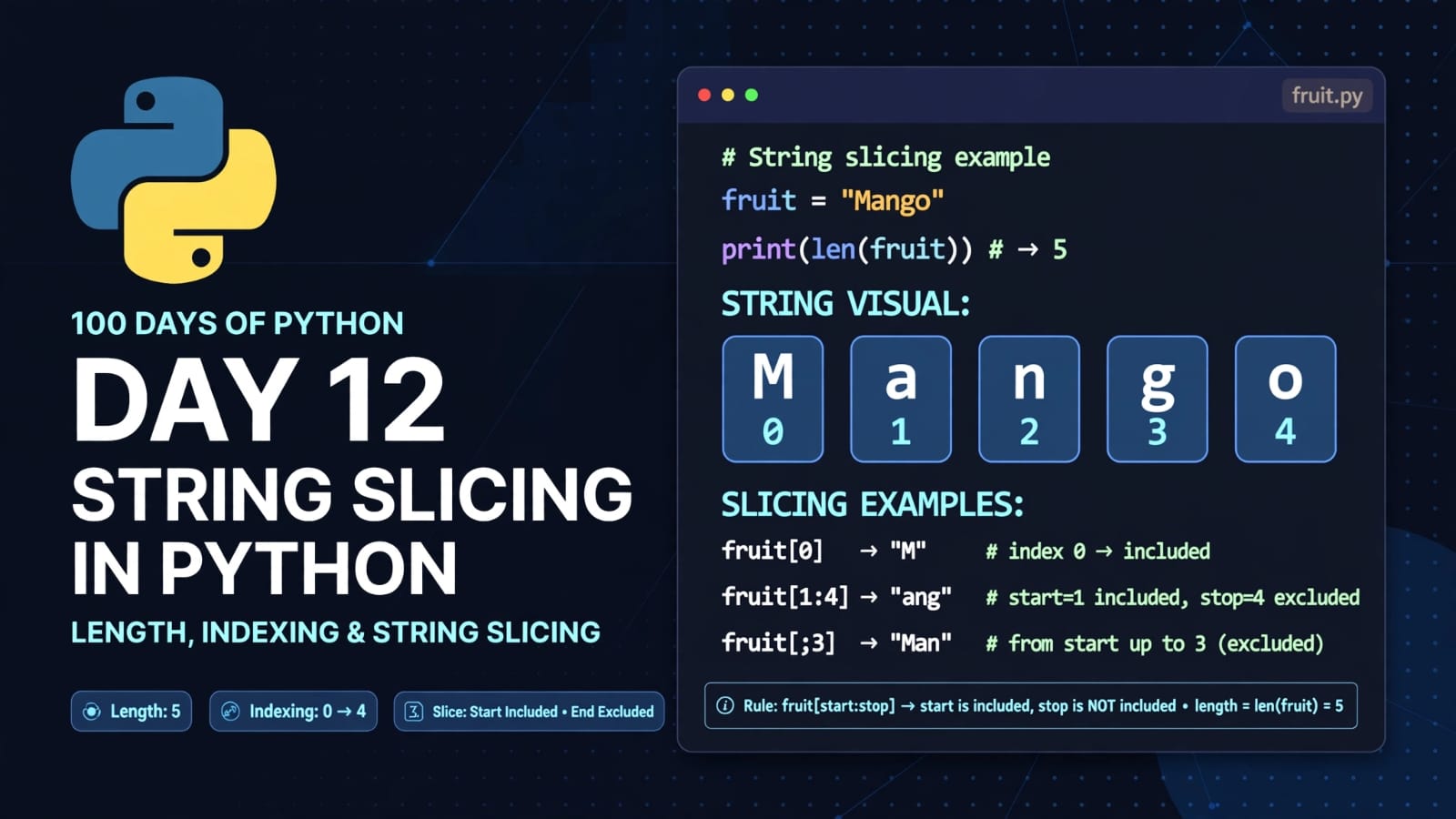
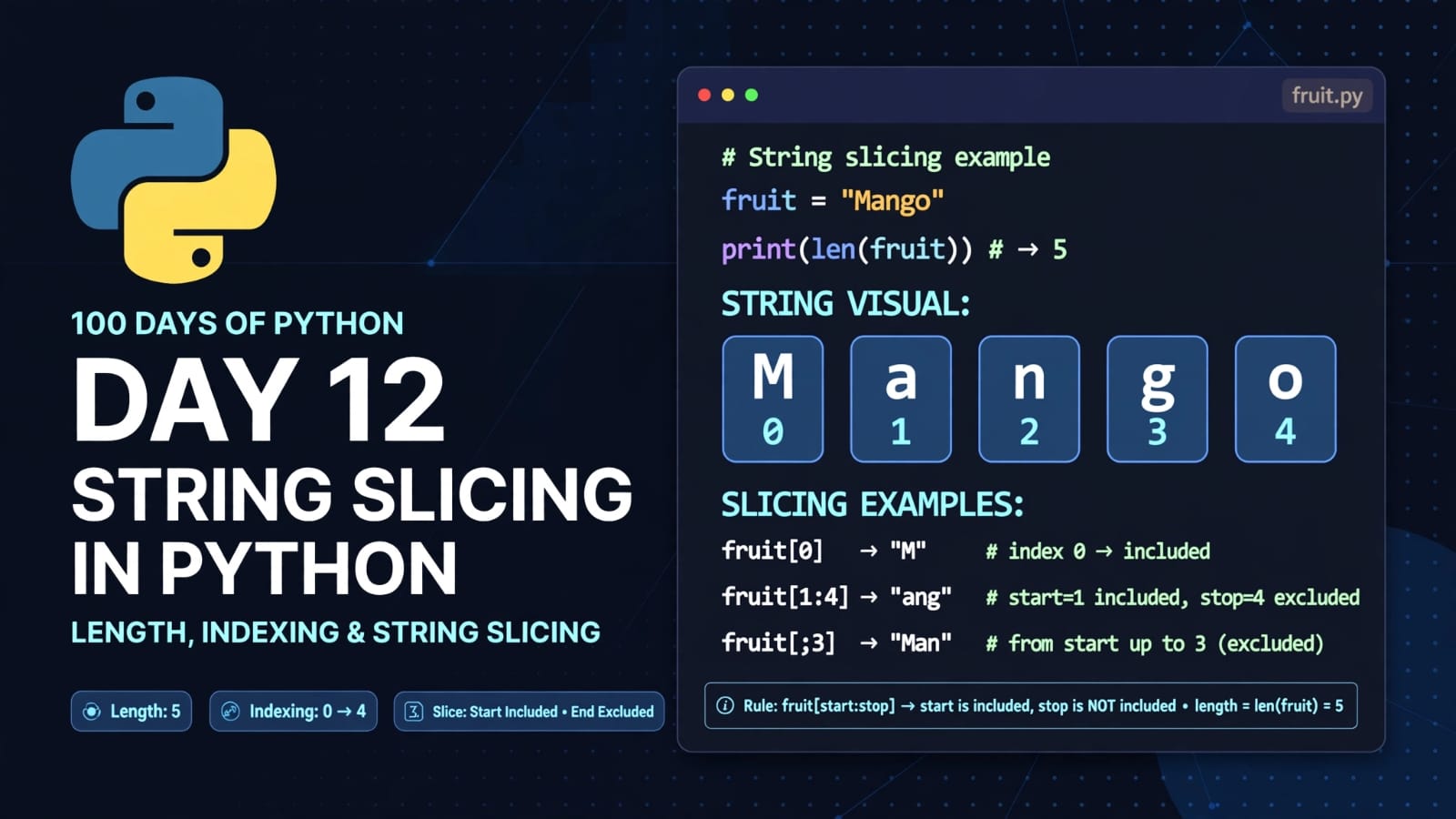
Welcome to Day 12 of 100 Days of Python!
In the previous lesson, we learned that strings are sequences of characters and that we can access individual characters using indexes.
Today, we will take that concept further and learn how to work with parts of strings using slicing.
String slicing is extremely useful when we need to extract a portion of text instead of working with the entire string.
Today, we will learn:
How to find the length of a string using
len()How strings behave like sequences of characters
How to access characters using indexes
What string slicing is
How to specify start and end indexes
Slicing from the beginning
Slicing until the end
Slicing a portion in between
Slicing using negative indexes
How the
start:endrule worksHow to loop through a string
Some important slicing edge cases
1. Finding the Length of a String
Python provides the built-in len() function to find the number of characters in a string.
For example:
fruit = "Mango"

len1 = len(fruit)

print("Mango is a", len1, "letter word.")
Output:
Mango is a 5 letter word.
The string "Mango" contains five characters:
M a n g o
Therefore:
len(fruit)
returns:
5
The len() function is useful when we need to know how many characters a string contains.
2. Strings as Sequences of Characters
A string is a sequence of characters.
For example:
fruit = "Mango"
The characters can be accessed using their indexes.
Character:  M   a   n   g   o
Index:      0   1   2   3   4
Python uses zero-based indexing, which means the first character has index 0.
For example:
print(fruit[0])
Output:
M
We can also access other characters:
print(fruit[1])
print(fruit[2])
print(fruit[3])
print(fruit[4])
Output:
a
n
g
o
3. What is String Slicing?
Sometimes we don't want to access just one character.
We may want to extract a part of a string.
This is called string slicing.
The basic syntax is:
string[start:end]
Here:
startis the index where slicing begins.endis the index where slicing stops.The
startindex is included.The
endindex is not included.
This is one of the most important rules to remember about Python slicing:
Start is included, end is excluded.
4. Basic String Slicing
Let's take the string:
fruit = "Mango"
Its indexes are:
Character:  M   a   n   g   o
Index:      0   1   2   3   4
Now let's slice it:
print(fruit[0:4])
Output:
Mang
Why?
The slice starts at index 0 and stops before index 4.
So Python selects:
Index:      0   1   2   3
Character:  M   a   n   g
Index 4, which contains o, is not included.
Therefore:
fruit[0:4]
produces:
Mang
5. Slicing from the Beginning
If the slice starts from index 0, we can leave the starting index empty.
Instead of:
print(fruit[0:4])
we can write:
print(fruit[:4])
Output:
Mang
Python automatically assumes the beginning of the string when the start index is omitted.
So:
fruit[:4]
is effectively:
fruit[0:4]
Both produce:
Mang
6. Slicing Until the End
We can also leave the ending index empty.
For example:
print(fruit[1:])
Output:
ango
Here, slicing starts at index 1 and continues until the end of the string.
The indexes are:
Character:  M   a   n   g   o
Index:      0   1   2   3   4
Starting from index 1 gives:
a n g o
Therefore:
fruit[1:]
produces:
ango
When the end index is omitted, Python continues until the end of the string.
7. Slicing a Portion in Between
We can select a specific portion of a string by providing both the starting and ending indexes.
For example:
print(fruit[1:4])
Output:
ang
The slice includes indexes:
1
2
3
but does not include index 4.
So:
Character:  M   a   n   g   o
Index:      0   1   2   3   4
                ←──────→
                  ang
Therefore:
fruit[1:4]
returns:
ang
8. Slicing the Entire String
We can use empty start and end indexes to select the entire string.
print(fruit[:])
Output:
Mango
This means:
fruit[:]
starts from the beginning and continues until the end.
It is equivalent to selecting the complete string.
9. Slicing Using Negative Indexes
Python also supports negative indexing.
Negative indexes count characters from the end of the string.
For:
fruit = "Mango"
the indexes are:
Positive:   0   1   2   3   4
Character:  M   a   n   g   o
Negative:  -5  -4  -3  -2  -1
So:
M → 0 or -5
a → 1 or -4
n → 2 or -3
g → 3 or -2
o → 4 or -1
For example:
print(fruit[-1])
Output:
o
The index -1 represents the last character.
10. Negative Index Slicing
We can also use negative indexes while slicing.
For example:
print(fruit[-3:-1])
Output:
ng
Let's understand this.
For:
M a n g o
the negative indexes are:
-5 -4 -3 -2 -1
The slice:
fruit[-3:-1]
starts at -3 and stops before -1.
Therefore, it selects:
n
g
and produces:
ng
Again, the same rule applies:
Start is included, end is excluded.
11. Negative Slicing from the Beginning
We can also use a negative index without specifying the ending index.
For example:
print(fruit[-5:])
Output:
Mango
Since -5 refers to the first character, this selects the entire string.
This technique can be useful when working with strings of unknown or changing lengths.
12. Slicing with len()
The len() function can also be used to calculate slicing positions dynamically.
For example:
fruit = "Mango"

print(fruit[0:len(fruit)-3])
First:
len(fruit)
returns:
5
Then:
len(fruit) - 3
becomes:
2
Therefore, the expression becomes:
fruit[0:2]
Output:
Ma
This demonstrates how len() and slicing can work together.
13. Another Way to Get the Same Result
We can also write:
print(fruit[0:-3])
Output:
Ma
Here, -3 refers to the character n.
Remember:
M   a   n   g   o
0   1   2   3   4
-5 -4  -3  -2  -1
The slice:
fruit[0:-3]
starts from index 0 and stops before negative index -3.
Therefore, it selects:
M a
and produces:
Ma
14. When the Slice Range Makes No Sense
Consider:
print(fruit[-1:-3])
At first, this may look like it should return some characters.
However, the starting position is -1, while the ending position is -3.
By default, Python slicing moves forward through the string.
Since -1 comes after -3 in the forward direction, there are no characters to select.
Therefore:
fruit[-1:-3]
produces:
An empty string is returned.
To slice backwards, Python provides a third slicing value called the step, which we will learn about in more detail later.
15. Looping Through a String
Strings are sequences of characters, so we can iterate through them using a for loop.
For example:
alphabets = "ABCDE"

for i in alphabets:
    print(i)
Output:
A
B
C
D
E
The loop takes one character at a time from the string.
During each iteration, the variable i contains the current character.
The process looks like this:
First iteration  → A
Second iteration → B
Third iteration  → C
Fourth iteration → D
Fifth iteration  → E
This is useful when we need to perform an operation on every character in a string.
16. Complete Program
Here is the complete program from today's practice:
fruit = "Mango"

len1 = len(fruit)

print("Mango is a", len1, "letter word.")

print(fruit[0:4])
print(fruit[:4])
print(fruit[1:4])
print(fruit[1:])
print(fruit[1:5])
print(fruit[:])
print(fruit[0:-3])
print(fruit[0:len(fruit)-3])
print(fruit[-1:-3])
print(fruit[-3:-1])

nm = "Harry"

print(nm[-4:-2])
17. Understanding the Program
Let's break down the important slicing operations used in the program.
Finding the length
len1 = len(fruit)
For:
fruit = "Mango"
the value of len1 is:
5
fruit[0:4]
print(fruit[0:4])
Output:
Mang
Indexes 0 through 3 are included.
Index 4 is excluded.
fruit[:4]
print(fruit[:4])
Output:
Mang
The missing start index means slicing begins from the beginning.
fruit[1:4]
print(fruit[1:4])
Output:
ang
Starts at index 1 and stops before index 4.
fruit[1:]
print(fruit[1:])
Output:
ango
Starts at index 1 and continues to the end.
fruit[1:5]
print(fruit[1:5])
Output:
ango
The string has length 5, so index 5 is the stopping point and is not included.
fruit[:]
print(fruit[:])
Output:
Mango
This selects the complete string.
fruit[0:-3]
print(fruit[0:-3])
Output:
Ma
The slice starts from 0 and stops before -3.
fruit[0:len(fruit)-3]
print(fruit[0:len(fruit)-3])
Since:
len(fruit) = 5
we get:
fruit[0:2]
Output:
Ma
fruit[-1:-3]
print(fruit[-1:-3])
Output:
The default slicing direction is forward, so there are no characters between these boundaries in that direction.
fruit[-3:-1]
print(fruit[-3:-1])
Output:
ng
The slice starts at -3 and stops before -1.
18. Quick Quiz
Let's look at one more example from today's practice.
nm = "Harry"

print(nm[-4:-2])
Let's map the indexes:
Character:  H   a   r   r   y
Positive:   0   1   2   3   4
Negative:  -5  -4  -3  -2  -1
The slice:
nm[-4:-2]
starts at -4 and stops before -2.
Therefore, it selects:
a r
Output:
ar
This is another example of the important slicing rule:
The start index is included, but the end index is excluded.
19. Important String Slicing Concepts
| Concept | Meaning |
|---|---|
len(string) |
Returns the number of characters |
string[index] |
Accesses one character |
string[start:end] |
Extracts a portion of a string |
start |
Starting position, included |
end |
Ending position, excluded |
string[:end] |
Slices from the beginning |
string[start:] |
Slices until the end |
string[:] |
Selects the entire string |
| Positive index | Counts from the beginning |
| Negative index | Counts from the end |
for char in string |
Loops through each character |
20. Quick Revision
Find the length
fruit = "Mango"

print(len(fruit))
Output:
5
Access a character
print(fruit[0])
Output:
M
Slice from the beginning
print(fruit[:4])
Output:
Mang
Slice from an index to the end
print(fruit[1:])
Output:
ango
Slice between two indexes
print(fruit[1:4])
Output:
ang
Copy the complete string using slicing
print(fruit[:])
Output:
Mango
Use negative indexes
print(fruit[-3:-1])
Output:
ng
Loop through a string
for character in fruit:
    print(character)
21. The Most Important Slicing Rule
Whenever you see:
string[start:end]
remember:
START → INCLUDED
END   → EXCLUDED
For example:
fruit = "Mango"

print(fruit[1:4])
The indexes are:
Character:  M   a   n   g   o
Index:      0   1   2   3   4
                ↑       ↑
              start    end
The result is:
ang
Index 1 is included.
Index 4 is excluded.
This rule is fundamental to understanding Python slicing.
22. Key Takeaways
After completing Day 12, you should understand:
How to find the length of a string using
len()That strings are sequences of characters
How to access characters using indexes
What string slicing means
How
string[start:end]worksThat the start index is included
That the end index is excluded
How to slice from the beginning using
[:end]How to slice until the end using
[start:]How to select an entire string using
[:]How negative indexes work
How to use negative indexes for slicing
How
len()can be combined with slicingWhy
fruit[-1:-3]returns an empty stringHow to loop through a string using a
forloop
String slicing is one of the most useful features of Python when working with text. As we continue learning Python, we will use slicing together with string methods, formatting, and other operations to manipulate text efficiently.
📂 Day 12 Resources
All notes and code for this day are available in the GitHub repository:
https://github.com/SriteshSuranjan/100-Days-of-Python/tree/main/12-Day12-Strings-Slicing