Day 20 – Functions in Python
🚀 Passionate DevOps Engineer with expertise in cloud computing, CI/CD, and automation. Skilled in Linux, Docker, Kubernetes, Terraform, Ansible, and Jenkins. I specialize in building scalable, secure, and automated infrastructures, optimizing software delivery pipelines, and integrating DevSecOps practices. Always exploring new ways to enhance deployment workflows and bridge the gap between development and operations.
Welcome to Day 20 of 100 Days of Python! 🐍
Today marks an important milestone in our Python journey.
So far, we have learned about:
Variables and data types
Strings and string methods
Conditional statements
match-caseforloopswhileloopsbreakandcontinue
Now we are going to learn one of the most important concepts in programming:
Functions
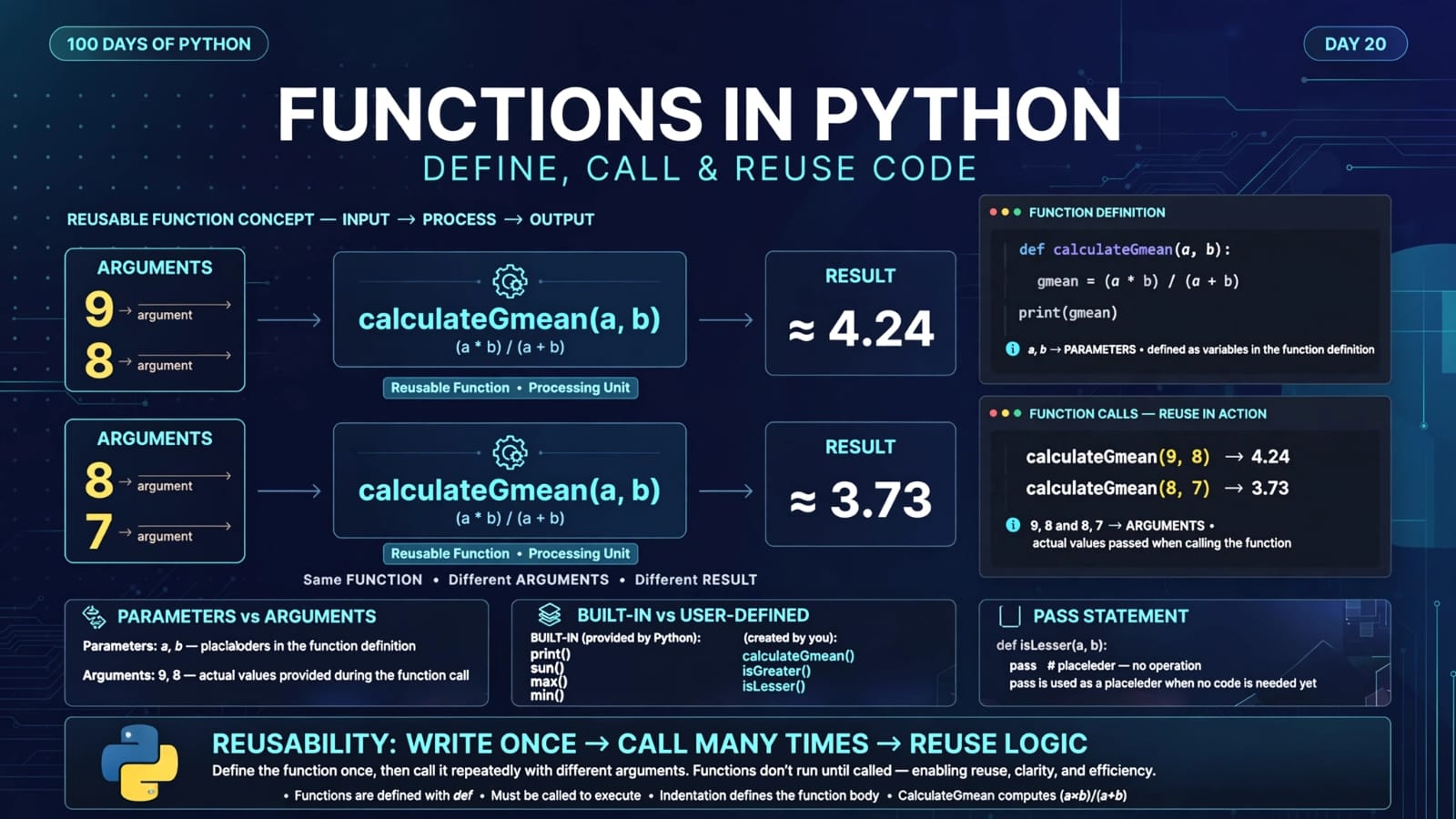
A function is a reusable block of code designed to perform a specific task.
Instead of writing the same logic repeatedly, we can place that logic inside a function and call the function whenever we need it.
This makes programs:
More organized
Easier to read
Easier to maintain
Easier to reuse
Easier to debug
📚 What We Will Learn
What is a function?
Why do we use functions?
Built-in functions
User-defined functions
Creating a function using
defFunction parameters
Function arguments
Calling a function
The
passstatementUnderstanding the Day 20 program
Why functions reduce repeated code
Important concepts at a glance
Quick revision
Key takeaways
1. What is a Function?
A function is a named, reusable block of code that performs a particular task when it is called.
For example:
def greet():
    print("Hello!")
Here:
def
is used to define a function.
The function is named:
greet
The code inside the function is:
print("Hello!")
However, defining the function does not automatically execute it.
We need to call it:
greet()
Output:
Hello!
2. Why Do We Use Functions?
Imagine that we need to calculate something multiple times.
Without a function, we might write:
a = 9
b = 8

gmean1 = (a * b) / (a + b)
print(gmean1)

c = 8
d = 7

gmean2 = (c * d) / (c + d)
print(gmean2)
The calculation:
(a * b) / (a + b)
is repeated.
Instead, we can put the calculation inside a function:
def calculateGmean(a, b):
    gmean = (a * b) / (a + b)
    print(gmean)
Then we can simply call:
calculateGmean(9, 8)
calculateGmean(8, 7)
This is one of the biggest benefits of functions:
Write the logic once and reuse it whenever needed.
3. Types of Functions in Python
There are two broad categories discussed in this lesson:
1. Built-in Functions
Functions that Python already provides.
Examples:
print()
len()
min()
max()
sum()
type()
range()
list()
tuple()
set()
dict()
2. User-Defined Functions
Functions that we create ourselves according to the requirements of our program.
Example:
def calculateGmean(a, b):
    gmean = (a * b) / (a + b)
    print(gmean)
4. Built-in Functions
Python comes with many functions that we can use directly.
For example:
numbers = [10, 20, 30, 40]

print(len(numbers))
print(max(numbers))
print(min(numbers))
print(sum(numbers))
Output:
4
40
10
100
We don't need to write the implementation of len(), max(), min(), or sum() ourselves.
Python provides them for us.
Some commonly used built-in functions
| Function | Purpose |
|---|---|
print() |
Displays output |
len() |
Returns the length/number of items |
max() |
Returns the largest item |
min() |
Returns the smallest item |
sum() |
Adds numeric items |
type() |
Returns the type of an object |
range() |
Produces a sequence of numbers |
list() |
Creates/converts to a list |
tuple() |
Creates/converts to a tuple |
set() |
Creates/converts to a set |
dict() |
Creates a dictionary |
5. User-Defined Functions
A user-defined function is a function that we create ourselves.
For example:
def greet():
    print("Hello, Python!")
We created this function because Python does not provide a built-in function called greet() for our specific message.
We can now call it:
greet()
Output:
Hello, Python!
6. Creating a Function
The general syntax is:
def function_name(parameters):
    # function body
For example:
def greet():
    print("Hello!")
Let's break this down.
def
The def keyword tells Python:
We are defining a function.
function_name
This is the name we give to the function.
Example:
greet
()
The parentheses contain the function's parameters.
If the function does not require parameters, they remain empty:
greet()
:
The colon marks the beginning of the function body.
Indentation
The statements belonging to the function must be indented.
def greet():
    print("Hello!")
    print("Welcome!")
Both print() statements belong to the function.
7. Calling a Function
Defining a function is not the same as executing it.
Consider:
def greet():
    print("Hello!")
Nothing is printed yet.
To execute the function, we call it:
greet()
Now the output is:
Hello!
So there are two important actions:
FUNCTION DEFINITION
        ↓
     def greet()
        ↓
FUNCTION CALL
        ↓
      greet()
        ↓
   Function executes
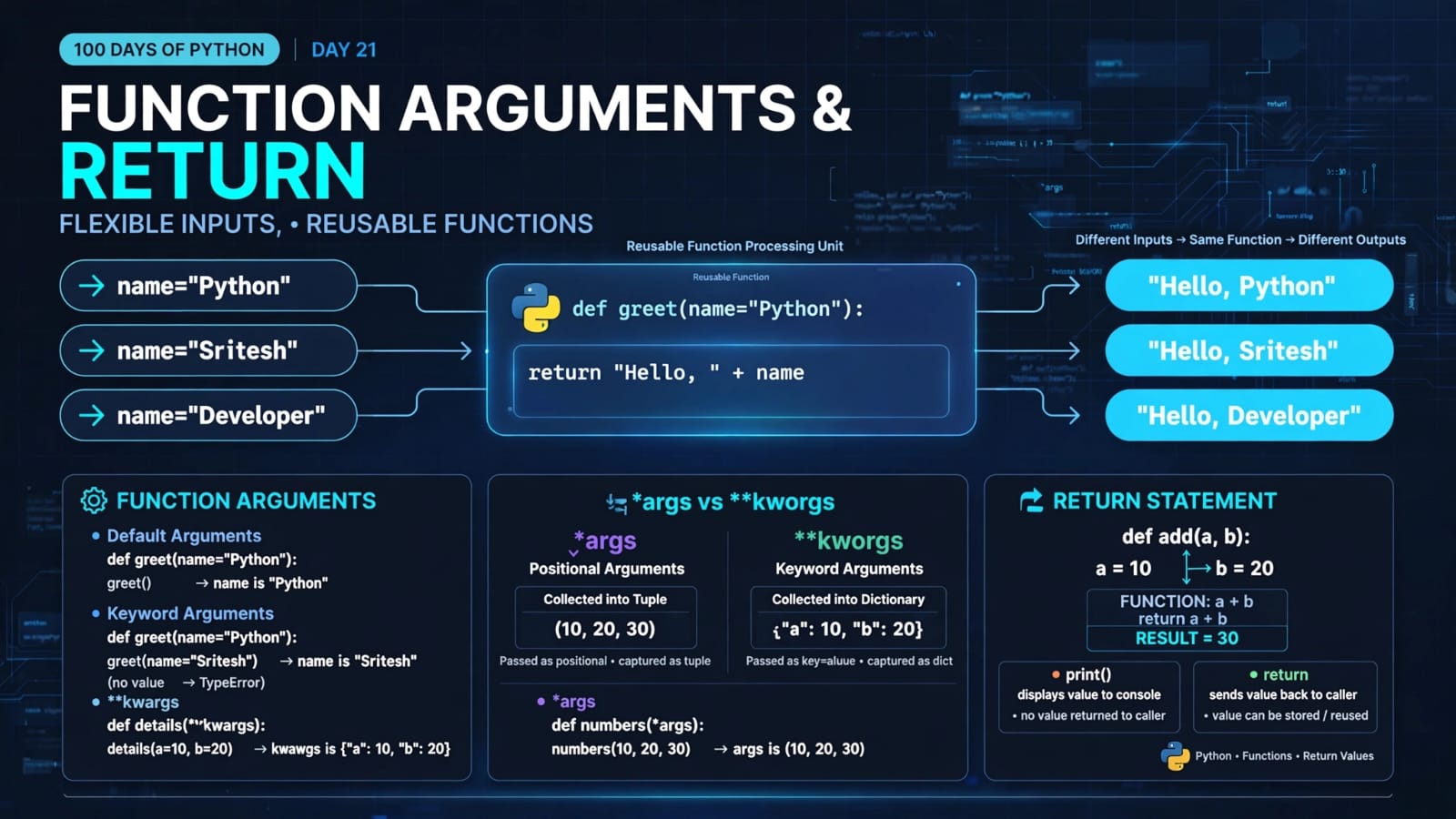
8. Parameters and Arguments
Functions can receive information from the code that calls them.
Consider:
def name(fname, lname):
    print("Hello,", fname, lname)
Here:
fname
lname
are called parameters.
When we call:
name("Sam", "Wilson")
the values:
"Sam"
"Wilson"
are called arguments.
So:
def name(fname, lname):
contains parameters.
While:
name("Sam", "Wilson")
passes arguments.
Easy way to remember
Parameters are the names defined by the function.
Arguments are the actual values passed during the function call.
9. Example with Parameters
def greet(name):
    print("Hello,", name)
Now call:
greet("Sritesh")
Output:
Hello, Sritesh
The relationship is:
name
 ↓
parameter

"Sritesh"
 ↓
argument
The argument is assigned to the parameter when the function is called.
10. Multiple Parameters
A function can have multiple parameters.
Example:
def add(a, b):
    print(a + b)
Calling:
add(10, 20)
Output:
30
Here:
a = 10
b = 20
The function then calculates:
a + b
which becomes:
10 + 20
and produces:
30
11. The pass Statement
Python does not allow an empty function body.
For example, this is invalid:
def isLesser(a, b):
Python expects an indented statement inside the function.
If we haven't written the logic yet, we can use:
def isLesser(a, b):
    pass
pass means:
Do nothing.
It acts as a placeholder so that the function can exist without performing any action yet.
For example:
def future_function():
    pass
This is valid Python.
Later, we can replace pass with the actual implementation.
12. Understanding the Day 20 Program
Now let's examine the complete main.py.
def calculateGmean(a, b):
    gmean = (a * b) / (a + b)
    print(gmean)

def isGreater(a, b):
    if a > b:
        print(f"{a} is greater than {b}")
    else:
        print(f"{b} is greater than {a}")

def isLesser(a, b):
    pass

a = 9
b = 8

isGreater(a, b)
calculateGmean(a, b)

c = 8
d = 7

isGreater(c, d)
calculateGmean(c, d)
The program defines three functions:
calculateGmean()
isGreater()
isLesser()
13. calculateGmean() Function
The first function is:
def calculateGmean(a, b):
    gmean = (a * b) / (a + b)
    print(gmean)
It accepts two parameters:
a
b
Then calculates:
(a * b) / (a + b)
and stores the result in:
gmean
Finally:
print(gmean)
displays the result.
14. Calling calculateGmean()
Later, the program executes:
calculateGmean(a, b)
At that point:
a = 9
b = 8
So the function effectively calculates:
(9 × 8) / (9 + 8)
which is:
72 / 17
approximately:
4.235294117647059
Then the function prints that value.
The same function can later be reused:
calculateGmean(c, d)
where:
c = 8
d = 7
This is exactly where the power of functions becomes visible.
We don't need to rewrite the calculation.
15. isGreater() Function
The second function is:
def isGreater(a, b):
    if a > b:
        print(f"{a} is greater than {b}")
    else:
        print(f"{b} is greater than {a}")
It receives two values and determines which one is greater.
For:
a = 9
b = 8
the condition:
a > b
becomes:
9 > 8
which is True.
Therefore:
9 is greater than 8
is printed.
16. Calling isGreater() Again
Later:
c = 8
d = 7

isGreater(c, d)
The same function is reused with different values.
Now:
c = 8
d = 7
Therefore:
8 > 7
is true.
Output:
8 is greater than 7
This demonstrates code reuse.
17. isLesser() Function
The third function is:
def isLesser(a, b):
    pass
At the moment, this function doesn't contain any actual logic.
The pass statement simply acts as a placeholder.
The function could later be implemented like:
def isLesser(a, b):
    if a < b:
        print(f"{a} is lesser than {b}")
    else:
        print(f"{b} is lesser than {a}")
But in today's program, that function is not called because the calls are commented out:
# isLesser(a, b)
and:
# isLesser(c, d)
Lines beginning with # are comments and are not executed.
18. Why Functions Make Code Better
Compare these two approaches.
Without a function
a = 9
b = 8

gmean1 = (a * b) / (a + b)
print(gmean1)

c = 8
d = 7

gmean2 = (c * d) / (c + d)
print(gmean2)
The calculation is repeated.
With a function
def calculateGmean(a, b):
    gmean = (a * b) / (a + b)
    print(gmean)

calculateGmean(9, 8)
calculateGmean(8, 7)
The logic is written once.
This gives us a much cleaner structure.
19. Function Reusability
One of the most important benefits of functions is reusability.
Suppose we have:
def isGreater(a, b):
    if a > b:
        print(f"{a} is greater than {b}")
    else:
        print(f"{b} is greater than {a}")
We can use it with:
isGreater(9, 8)
isGreater(100, 50)
isGreater(7, 25)
isGreater(-2, -10)
The same logic works for every call.
We write the logic once and reuse it with different inputs.
20. Functions Help Organize Large Programs
Imagine a large application containing thousands of lines of code.
Instead of putting everything into one giant block, we can divide the program into smaller functions:
main program
    │
    ├── get_user_data()
    │
    ├── validate_data()
    │
    ├── calculate_result()
    │
    ├── save_result()
    │
    └── display_result()
Each function can focus on a particular responsibility.
This makes the program easier to understand and maintain.
21. Function Definition vs Function Call
This distinction is very important.
Function definition
def greet():
    print("Hello")
This creates the function.
Function call
greet()
This executes the function.
Think of it as:
def greet()
     ↓
Create the reusable instructions

greet()
     ↓
Execute those instructions
22. Function Parameters vs Arguments
Another important distinction:
def calculate(a, b):
Here:
a and b → parameters
When we call:
calculate(10, 20)
then:
10 and 20 → arguments
A simple way to remember:
Definition → Parameters
Call       → Arguments
23. Important Concepts at a Glance
| Concept | Meaning |
|---|---|
| Function | Reusable block of code |
def |
Keyword used to define a function |
| Function name | Name used to identify and call the function |
| Parameter | Variable listed in a function definition |
| Argument | Actual value passed during a function call |
| Function call | Executes the function |
| Built-in function | Function already provided by Python |
| User-defined function | Function created by the programmer |
pass |
Placeholder that performs no operation |
| Indentation | Defines the function body |
| Reusability | Ability to use the same function multiple times |
24. Quick Revision
Define a function
def greet():
    print("Hello!")
Call a function
greet()
Function with parameters
def greet(name):
    print("Hello,", name)
Call with an argument
greet("Sritesh")
Multiple parameters
def add(a, b):
    print(a + b)
Multiple arguments
add(10, 20)
Placeholder function
def future_function():
    pass
25. Key Takeaways
A function is a reusable block of code designed to perform a specific task.
Python provides many built-in functions such as
print(),len(),sum(), andmax().We can create our own user-defined functions using the
defkeyword.A function is executed when we call it.
Parameters are defined in the function definition.
Arguments are the actual values passed to the function.
Function logic must be properly indented.
passcan be used as a placeholder when a function does not have its implementation yet.Functions reduce code duplication.
Functions improve code organization and readability.
The same function can be called multiple times with different arguments.
Functions become especially important as programs become larger and more complex.
📂 Day 20 Resources
https://github.com/SriteshSuranjan/100-Days-of-Python/tree/main/20-Day20-Functions